


Peplink MAX BR1 Mini LTE Cat 7 Router (FirstNet Certified)
Pair with a 5G plan
Add a Crosstalk Mobile plan and the router drops 10%. Applied automatically at checkout.
-
More info

The Crosstalk Mobile Unlimited Plan is a data-only 5G SIM card on T-Mobile's network for $149 a month. It has no data cap, no overage charges, and no contract.
The plan is made for routers and hotspots and won't work in a phone. The SIM is free, and you manage the line from your online account, where you activate it, update billing or cancel.
Network and coverage
The plan is built for 5G and falls back to 4G LTE where 5G isn't available. Service covers the lower 48 states, Hawaii and Puerto Rico. Alaska, other US territories, Canada and Mexico aren't covered yet.
The SIM hands off between towers while you drive, the same way a phone does. We've run it in command vehicles and fleets.
Routers that work with it
Any 5G router that takes a standard SIM card will work, including every Peplink we sell. If you're still choosing, these are the ones we stock and support:
- GL.iNet Spitz AX: a compact 5G router with Wi-Fi 6 that can also use Starlink or campground Wi-Fi as a backup. It suits RVs and small remote sites.
- Peplink B One 5G: a desktop router for a home or office that runs 5G alongside a wired connection.
- Peplink MAX BR1 Pro 5G: bonds cellular, Starlink and Wi-Fi with SpeedFusion, so a video call keeps going when one connection drops.
- Peplink MAX BR2 Pro 5G: two 5G modems, so you can add a second carrier for redundancy.
- Pepwave 5G Adapter: adds 5G to a router you already own.
Not sure which fits? Take the router quiz or give us a call.
How activation works
- Check out. Your first month is charged at checkout.
- Within a few minutes you'll get an email with a link to set up your account. You need the account to activate the SIM.
- We ship the SIM. Orders placed before 11 a.m. Pacific ship the same day. Standard shipping takes 5 to 7 business days and express takes 2 to 3.
- Put the SIM in your router and activate the line from your account. Most routers connect without an APN entered, and we recommend leaving it blank unless your line has a static IP.
Billing starts when you insert the SIM or 30 days after it ships, whichever comes first.
Static IP add-on
For $5 a month you can add a static IP, which is a dedicated public address on your line. Choose it if you need to reach something behind the router from outside, such as security cameras, an NVR, a server or the router's admin page. Browsing, streaming and video calls work fine without one. A static IP line uses its own APN, and our static IP setup guide walks through it for Peplink and UniFi.
Common questions
Is it really unlimited?
Yes. There's no data cap, no overage charge and no speed limit built into the plan.
Can I use it in a phone?
No. It's a data-only plan for routers and hotspots.
Do I need to enter an APN?
Usually not. Most routers pick up the right settings on their own, so leave the APN blank. The only exception is a line with a static IP, which needs the static IP APN.
Is there a contract?
No. You can cancel the monthly or annual plan at any time. Cancelling stops the next renewal, but it doesn't refund time you've already paid for.
Is there a cheaper way to pay?
The annual plan is $1,428 a year. That works out to $119 a month and saves $360. Businesses with 10 or more lines get volume pricing on our fleet connectivity page.
Who answers when I call?
One of our network engineers. Call 888-381-7750, Monday to Friday, 6:30 a.m. to 3 p.m. Pacific, or email CustomerService@CrosstalkMobile.com.
The full terms are in our terms of service.
+$149.00 -
More info
The Crosstalk Mobile Unlimited Plan, Annual is the same data-only 5G SIM card on T-Mobile's network as our monthly plan, paid a year at a time. You pay $1,428 up front, which works out to $119 a month and saves $360 over twelve monthly payments. There's no data cap and no overage charges.
The plan is made for routers and hotspots and won't work in a phone. The SIM is free, and you manage the line from your online account, where you activate it, update billing or cancel.
Who the annual plan suits
The annual plan is the better deal when the line runs all year, like a fixed site, a business failover link or a full-time RV. If you only need service a few months at a time, the monthly plan at $149 a month is easier to start and stop.
Network and coverage
The plan is built for 5G and falls back to 4G LTE where 5G isn't available. Service covers the lower 48 states, Hawaii and Puerto Rico. Alaska, other US territories, Canada and Mexico aren't covered yet.
The SIM hands off between towers while you drive, the same way a phone does. We've run it in command vehicles and fleets.
Routers that work with it
Any 5G router that takes a standard SIM card will work, including every Peplink we sell. If you're still choosing, these are the ones we stock and support:
- GL.iNet Spitz AX: a compact 5G router with Wi-Fi 6 that can also use Starlink or campground Wi-Fi as a backup. It suits RVs and small remote sites.
- Peplink B One 5G: a desktop router for a home or office that runs 5G alongside a wired connection.
- Peplink MAX BR1 Pro 5G: bonds cellular, Starlink and Wi-Fi with SpeedFusion, so a video call keeps going when one connection drops.
- Peplink MAX BR2 Pro 5G: two 5G modems, so you can add a second carrier for redundancy.
- Pepwave 5G Adapter: adds 5G to a router you already own.
Not sure which fits? Take the router quiz or give us a call.
How activation works
- Check out. The full year is charged at checkout.
- Within a few minutes you'll get an email with a link to set up your account. You need the account to activate the SIM.
- We ship the SIM. Orders placed before 11 a.m. Pacific ship the same day. Standard shipping takes 5 to 7 business days and express takes 2 to 3.
- Put the SIM in your router and activate the line from your account. Most routers connect without an APN entered, and we recommend leaving it blank unless your line has a static IP.
Static IP add-on
For $60 a year you can add a static IP, which is a dedicated public address on your line. Choose it if you need to reach something behind the router from outside, such as security cameras, an NVR, a server or the router's admin page. Browsing, streaming and video calls work fine without one. A static IP line uses its own APN, and our static IP setup guide walks through it for Peplink and UniFi.
Common questions
Is it really unlimited?
Yes. There's no data cap, no overage charge and no speed limit built into the plan.
Can I use it in a phone?
No. It's a data-only plan for routers and hotspots.
Do I need to enter an APN?
Usually not. Most routers pick up the right settings on their own, so leave the APN blank. The only exception is a line with a static IP, which needs the static IP APN.
Can I cancel?
Yes, at any time. Cancelling stops the next renewal, and the line stays on through the end of the year you've paid for. The prepaid year isn't refunded once the SIM is active.
Is there a month-to-month option?
Yes. The monthly plan is the same service for $149 a month with no commitment. Businesses with 10 or more lines get volume pricing on our fleet connectivity page.
Who answers when I call?
One of our network engineers. Call 888-381-7750, Monday to Friday, 6:30 a.m. to 3 p.m. Pacific, or email CustomerService@CrosstalkMobile.com.
The full terms are in our terms of service.
+$1,428.00

Optional accessories
Compatible mounts, cables, and antennas.
-
More info


The Peplink ANT-MAX puts your router outside, in a weatherproof housing with its own antennas. One Ethernet cable runs back indoors for data and power. With the router right next to the antennas the coax stays short, and short coax loses less signal at 5G frequencies than a long run through a wall.
What's inside
- 4x4 MIMO cellular antennas covering 617 to 6000 MHz
- Two Wi-Fi antennas (2.4 and 5 GHz) and a GPS antenna
- Right-angle SMA connectors for cellular and GPS, RP-SMA for Wi-Fi, so the router plugs in without adapters
Routers it fits
- MAX BR1 Mini series
- MAX BR1 Pro 5G
- MAX Transit Duo Pro
- Pepwave 5G Adapter, to add 5G to a router you already own
Powering it
Run one Ethernet cable from the enclosure to a PoE Injector or PoE switch indoors. The current BR1 Pro 5G and BR1 Mini take PoE directly. Routers without PoE input also need a Splitter Max.
Mounting
It mounts to a wall, pole, or flat panel with the included L-mount set and 3M adhesive pad. A deck mount isn't included. Three cable glands seal the cable entry, and two hole plugs cover the openings you don't use.
Common questions
Why put the router outside?
Every foot of coax between a router and its antennas loses signal, and the loss is worst at 5G frequencies. With the router inside the enclosure, the antenna leads are only a few connectors long, and the only cable that runs inside is Ethernet.
Will it work on a vehicle?
Yes. It's rated IP67 and from -40 to 176°F. Mount it on a roof rack or pole with the L-mount set.
Can I put a dual-modem router in it?
No. For a MAX BR2 Pro or two routers, use the ANT-MAX-DUO.
Specs
- Housing: IP67, rated -40 to 176°F
- Size: 9.84 in diameter, 4.72 in tall
- Cellular gain: 3.0 dBi (617 to 960 MHz), 6.2 dBi (1410 to 2700 MHz), 5.7 dBi (3400 to 4200 MHz), 6.6 dBi (5000 to 6000 MHz)
- Wi-Fi: 2.4 to 2.5 and 5.0 to 6.0 GHz; GPS: 1575 to 1602 MHz
- In the box: enclosure, L-mount set, 3M adhesive pad, three cable glands, two hole plugs
Adding Starlink Mini? See the ANT-MAX-S. Call 888-381-7750 and we'll put the parts list together for your router. See all antenna enclosures.
+$349.00 -
More info


The Peplink Splitter Max takes power and data off a single PoE cable and splits them into a 12V DC output and a normal Ethernet connection. It's built for outdoor and vehicle installs where one cable has to power a router that has no PoE input.
When you need one
Use it when a router or device in an outdoor install can't take PoE directly. A common case is an ANT-MAX enclosure with an older router. The current MAX BR1 Pro 5G and BR1 Mini both accept 802.3at PoE, so they don't need it. It can also power other 12V devices that draw under 48 watts, including more than one Peplink device at once.
How it works
On the indoor end, power the cable with a PoE switch or injector. 802.3af, at, and bt sources all work, and a higher-class source gives you more power at the far end. At the router, the Splitter Max sends 12V DC out through a Micro-Fit to terminal block cable and passes data through on its second Ethernet port. Both Ethernet ports run at up to 2.5 Gbps, so a 2.5G WAN isn't slowed down.
It's isolated between the power and data lines, with surge and ESD protection on the PoE input. That helps protect the router from surges coming down a long outdoor cable run.
Specs
- PoE input: IEEE 802.3bt, works with 802.3af and 802.3at
- Output: 12V DC, up to 48W
- Ethernet: 2x 10/100/1000/2500 Mbps
- Efficiency: 88 to 91%
- Protection: ESD ±8 kV contact and ±15 kV air, surge ±4 kV on PoE input, galvanic isolation
- Housing: anodized aluminum
- Size and weight: 4.02 x 1.97 x 1.04 in, 0.31 lb
- Operating temperature: -40 to 158°F
- In the box: Splitter Max and a 100 mm DC cable
Not sure whether your router takes PoE? Call 888-381-7750 and we'll check the model for you. See all router accessories.
+$99.00 -
More info
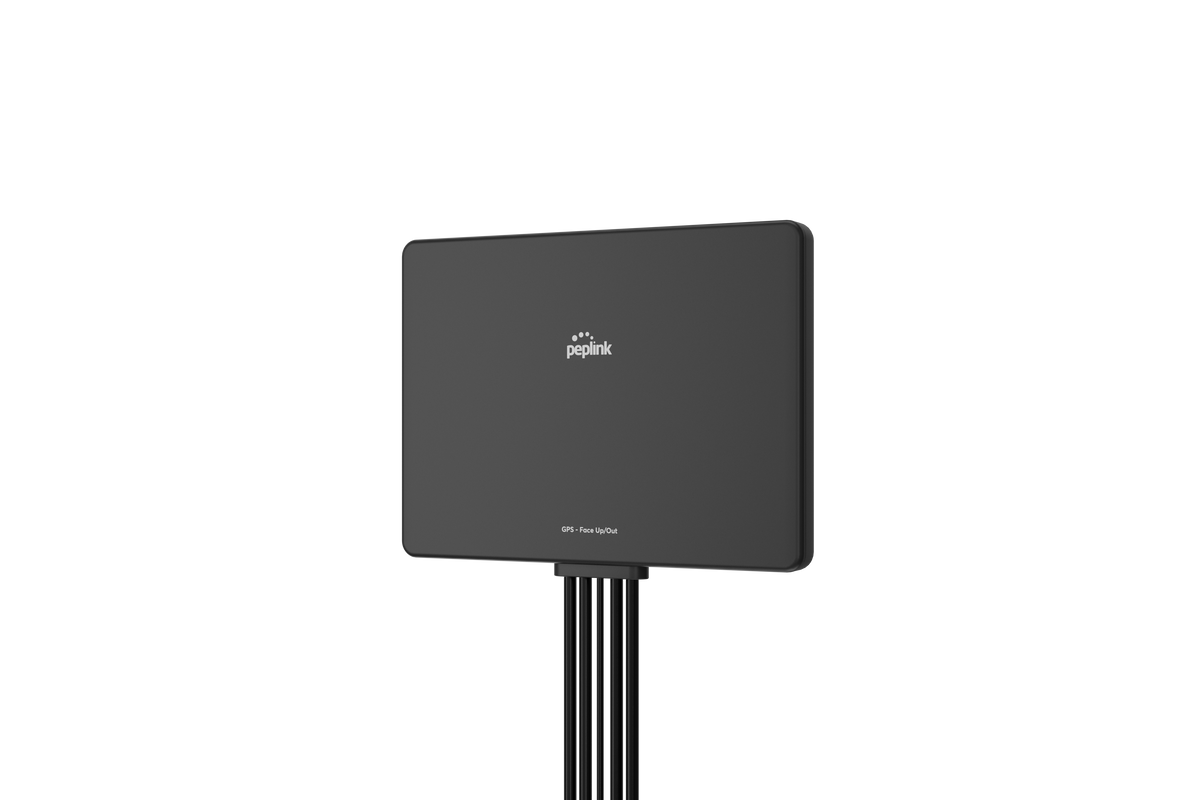

The Peplink Slim 22G is a flat, low-profile antenna with two cellular elements, two Wi-Fi elements, and GPS in one housing. It mounts on a window or wall with hook-and-loop strips, or tucks under a vehicle dashboard.
Check your router first
The Slim 22G is for routers with two cellular ports. Most current 5G routers, including every Peplink and the Spitz AX we sell, have four cellular ports and get full performance from a 4x4 antenna like the Slim 40G or Mobility 40G. If you're not sure how many ports yours has, call us before you order.
Where it fits
- Older or compact routers with two cellular ports and Wi-Fi ports
- Window mounts at a home or small office
- Vehicles where you want the antenna hidden behind the dash
Installing it
Mount it with the top edge pointing up toward the sky, on the window that faces the nearest tower. Keep it off metal window film and away from large metal objects. The cables are 6.5 ft (2 m) long, with SMA connectors for cellular and GPS and RP-SMA connectors for Wi-Fi, so they plug straight into most routers.
Specs
- Elements: 2x cellular (2x2 MIMO), 2x Wi-Fi, 1x GPS
- Cellular: 617 to 960 MHz (4.1 dBi), 1710 to 2700 MHz (4.3 dBi), 3400 to 4200 MHz (6.0 dBi), 5000 to 6000 MHz (7.5 dBi)
- Wi-Fi: 2.4 to 2.5 GHz (5.5 dBi), 5 to 6 GHz (5.7 dBi)
- GPS: 1561 to 1602 MHz, with a 28 dB LNA
- Cables: 6.5 ft (2 m); CFD-200 for cellular and Wi-Fi, RG-174 for GPS
- Connectors: SMA male (cellular, GPS), RP-SMA male (Wi-Fi)
- Size: 7.09 x 5.12 x 0.59 in
- Housing: UV-stable black polycarbonate, IP55
- Operating temperature: -40 to 176°F
- In the box: antenna and four hook-and-loop strips
See all cellular antennas.
+$149.00 -
More info


 +$249.00
-
More info

 +$299.00
-
More info
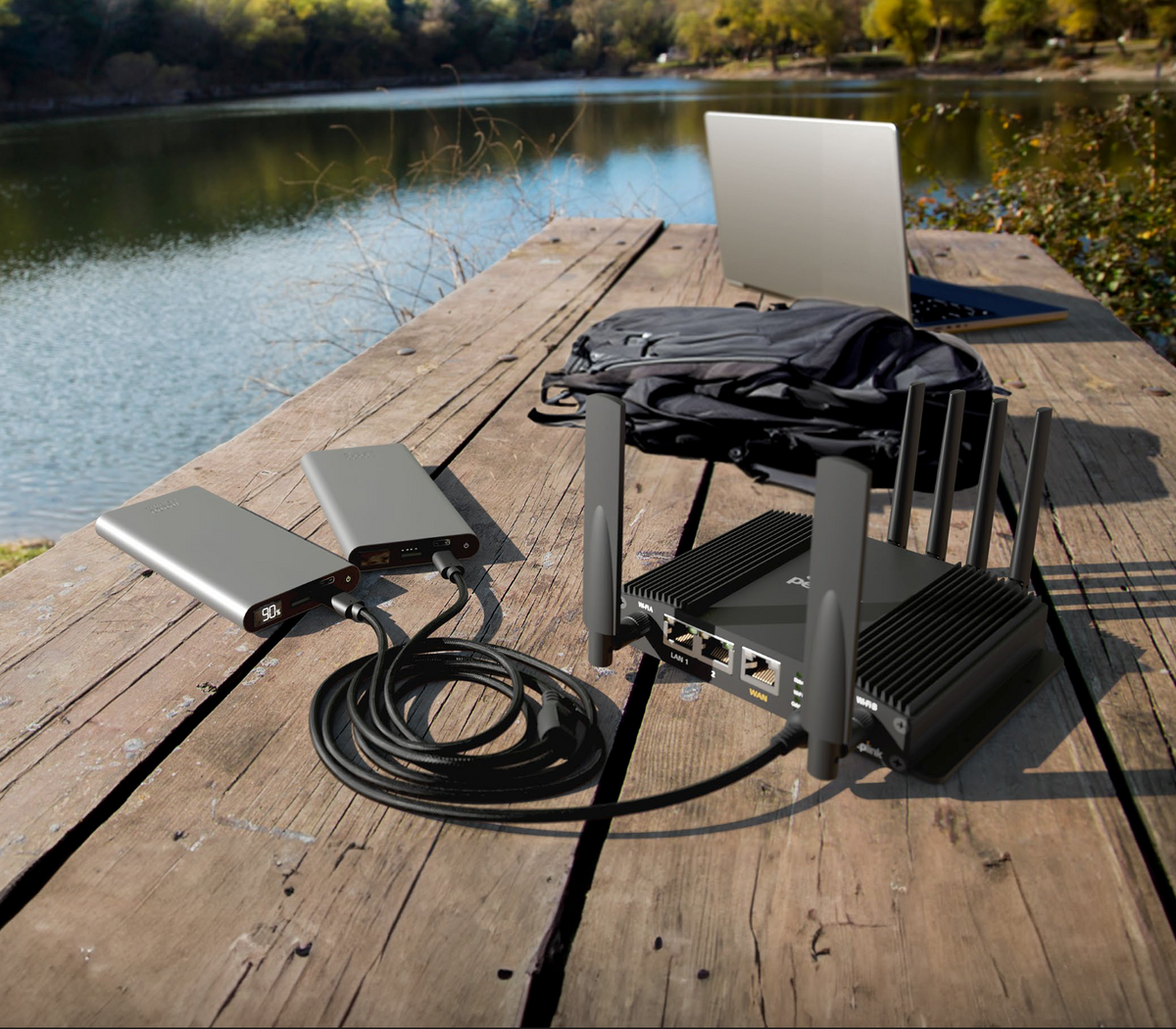

Power your Peplink router from USB-C instead of a dedicated DC supply. The ACW-791 connects any Peplink router with a 4-pin (Molex) power input to USB-C sources you already carry, like power banks and AC adapters.
The cable splits into two USB-C plugs. Connect two power banks and they share the load equally while jointly supplying 15V to the router. If one bank runs flat or fails, the other keeps the router running without a drop in connection. That makes it a good fit for vehicle installs, pop-up sites and field work where mains power isn't guaranteed.
The outer jacket is nylon braided, so it holds up to being coiled, packed and pulled around on the job.
Specifications
- Part number: ACW-791
- Router end: 4-pin (Molex)
- Source end: dual USB-C
- Overall length: approx. 1500 mm
- Split lengths: approx. 400 mm and 1070 mm
- Protection: 3A current protection on each USB-C port
- Jacket: braided nylon
Compatibility
Works with any Peplink router fitted with a 4-pin (Molex) power input.Recommended power source
+$19.00
Use a source that can deliver 15V. Peplink routers will run on 12V, but 15V gives more reliable performance.


Discount applied automatically at checkout.
SpeedFusion bonding speeds
This is a 4G LTE router. It does not connect to 5G. If you plan to stream video, move large files, or run it as your main internet connection, get the 5G version of the MAX BR1 Mini instead.
The Peplink MAX BR1 Mini LTE suits jobs that move small amounts of data and can't go down. It has one Cat 7 modem, and the two nano-SIM slots let you keep a second carrier ready as a spare. You also get dual-band Wi-Fi 5 and three Gigabit Ethernet ports, and this model is FirstNet Certified.
Where this cellular router fits
- Failover for a POS terminal or retail counter
- Kiosks and IoT devices that send small amounts of data
- VoIP phones at a small branch office
- Utility sites and work vehicles
Tech notes from our engineers
The modem is rated at 300 Mbps down and 150 Mbps up. Those are theoretical maximums, so your tower and signal set the real speed.
Only one SIM runs at a time. If you load two, the second one waits as a backup.
Hot Failover, WAN Smoothing, Wi-Fi WAN, and the higher SpeedFusion limits need PrimeCare, and the first year is included. With PrimeCare, SpeedFusion VPN reaches 60 Mbps with 256-bit AES and the router supports 5 peers, up from 2. Unencrypted SpeedFusion tops out at 80 Mbps.
Power it from the included 12V supply, any 10 to 30V DC source, or 802.3at PoE on LAN 1. DC and PoE can run together for redundancy. A PoE Injector lets one Ethernet cable carry both data and power, and the 10ft DC power cable handles direct wiring in a vehicle.
Specs
- Cellular: 1x Cat 7 LTE modem
- US carrier certifications: AT&T, T-Mobile, Verizon, FirstNet
- SIM: 2x nano-SIM
- Wi-Fi: Wi-Fi 5, 2x2 MIMO, 2.4 and 5 GHz
- Ethernet: 3x Gigabit ports
- Router throughput: 300 Mbps
- Antenna connectors: 2x SMA cellular, 2x RP-SMA Wi-Fi, 1x SMA GPS
- Power draw: 13W typical, 18W max
- Size: 5.0 x 4.2 x 1.4 in, 0.95 lb
- Operating temperature: -40 to 149°F
- In the box: router, 2 LTE antennas, 2 Wi-Fi antennas, GPS antenna, 12V power supply
Common questions
Can I upgrade this router to 5G later?
No. The modem is built in and can't be replaced, so if you expect to need 5G, start with the 5G MAX BR1 Mini.
What data plan should I pair with it?
Our unlimited plan has no data cap, so a long outage won't run up a bill. Call 888-381-7750 and an engineer will help you plan the setup.
Official Peplink data sheet — full specs, ports, throughput, and regulatory info.
Open data sheet (PDF · 1.0 MB)Free standard shipping on hardware orders over $250. Same-day shipping if ordered by 2pm EST.
Returns: 14 days from delivery. Items must be in new, unused condition with all original packaging, accessories, and documentation intact. A 10% restocking fee applies to all returns (waived for items that arrive defective or dead on arrival). Original shipping charges are non-refundable; return shipping is the customer's responsibility. Peplink subscription licenses (PrimeCare, Virtual WAN, SpeedFusion) are non-refundable. Email CustomerService@CrosstalkMobile.com with your order number to start a return.
