


Peplink B One 5G
Pair with a 5G plan
Add a Crosstalk Mobile plan and the router drops 10%. Applied automatically at checkout.
-
More info

The Crosstalk Mobile Unlimited Plan is a data-only 5G SIM card on T-Mobile's network for $149 a month. It has no data cap, no overage charges, and no contract.
The plan is made for routers and hotspots and won't work in a phone. The SIM is free, and you manage the line from your online account, where you activate it, update billing or cancel.
Network and coverage
The plan is built for 5G and falls back to 4G LTE where 5G isn't available. Service covers the lower 48 states, Hawaii and Puerto Rico. Alaska, other US territories, Canada and Mexico aren't covered yet.
The SIM hands off between towers while you drive, the same way a phone does. We've run it in command vehicles and fleets.
Routers that work with it
Any 5G router that takes a standard SIM card will work, including every Peplink we sell. If you're still choosing, these are the ones we stock and support:
- GL.iNet Spitz AX: a compact 5G router with Wi-Fi 6 that can also use Starlink or campground Wi-Fi as a backup. It suits RVs and small remote sites.
- Peplink B One 5G: a desktop router for a home or office that runs 5G alongside a wired connection.
- Peplink MAX BR1 Pro 5G: bonds cellular, Starlink and Wi-Fi with SpeedFusion, so a video call keeps going when one connection drops.
- Peplink MAX BR2 Pro 5G: two 5G modems, so you can add a second carrier for redundancy.
- Pepwave 5G Adapter: adds 5G to a router you already own.
Not sure which fits? Take the router quiz or give us a call.
How activation works
- Check out. Your first month is charged at checkout.
- Within a few minutes you'll get an email with a link to set up your account. You need the account to activate the SIM.
- We ship the SIM. Orders placed before 11 a.m. Pacific ship the same day. Standard shipping takes 5 to 7 business days and express takes 2 to 3.
- Put the SIM in your router and activate the line from your account. Most routers connect without an APN entered, and we recommend leaving it blank unless your line has a static IP.
Billing starts when you insert the SIM or 30 days after it ships, whichever comes first.
Static IP add-on
For $5 a month you can add a static IP, which is a dedicated public address on your line. Choose it if you need to reach something behind the router from outside, such as security cameras, an NVR, a server or the router's admin page. Browsing, streaming and video calls work fine without one. A static IP line uses its own APN, and our static IP setup guide walks through it for Peplink and UniFi.
Common questions
Is it really unlimited?
Yes. There's no data cap, no overage charge and no speed limit built into the plan.
Can I use it in a phone?
No. It's a data-only plan for routers and hotspots.
Do I need to enter an APN?
Usually not. Most routers pick up the right settings on their own, so leave the APN blank. The only exception is a line with a static IP, which needs the static IP APN.
Is there a contract?
No. You can cancel the monthly or annual plan at any time. Cancelling stops the next renewal, but it doesn't refund time you've already paid for.
Is there a cheaper way to pay?
The annual plan is $1,428 a year. That works out to $119 a month and saves $360. Businesses with 10 or more lines get volume pricing on our fleet connectivity page.
Who answers when I call?
One of our network engineers. Call 888-381-7750, Monday to Friday, 6:30 a.m. to 3 p.m. Pacific, or email CustomerService@CrosstalkMobile.com.
The full terms are in our terms of service.
+$149.00 -
More info
The Crosstalk Mobile Unlimited Plan, Annual is the same data-only 5G SIM card on T-Mobile's network as our monthly plan, paid a year at a time. You pay $1,428 up front, which works out to $119 a month and saves $360 over twelve monthly payments. There's no data cap and no overage charges.
The plan is made for routers and hotspots and won't work in a phone. The SIM is free, and you manage the line from your online account, where you activate it, update billing or cancel.
Who the annual plan suits
The annual plan is the better deal when the line runs all year, like a fixed site, a business failover link or a full-time RV. If you only need service a few months at a time, the monthly plan at $149 a month is easier to start and stop.
Network and coverage
The plan is built for 5G and falls back to 4G LTE where 5G isn't available. Service covers the lower 48 states, Hawaii and Puerto Rico. Alaska, other US territories, Canada and Mexico aren't covered yet.
The SIM hands off between towers while you drive, the same way a phone does. We've run it in command vehicles and fleets.
Routers that work with it
Any 5G router that takes a standard SIM card will work, including every Peplink we sell. If you're still choosing, these are the ones we stock and support:
- GL.iNet Spitz AX: a compact 5G router with Wi-Fi 6 that can also use Starlink or campground Wi-Fi as a backup. It suits RVs and small remote sites.
- Peplink B One 5G: a desktop router for a home or office that runs 5G alongside a wired connection.
- Peplink MAX BR1 Pro 5G: bonds cellular, Starlink and Wi-Fi with SpeedFusion, so a video call keeps going when one connection drops.
- Peplink MAX BR2 Pro 5G: two 5G modems, so you can add a second carrier for redundancy.
- Pepwave 5G Adapter: adds 5G to a router you already own.
Not sure which fits? Take the router quiz or give us a call.
How activation works
- Check out. The full year is charged at checkout.
- Within a few minutes you'll get an email with a link to set up your account. You need the account to activate the SIM.
- We ship the SIM. Orders placed before 11 a.m. Pacific ship the same day. Standard shipping takes 5 to 7 business days and express takes 2 to 3.
- Put the SIM in your router and activate the line from your account. Most routers connect without an APN entered, and we recommend leaving it blank unless your line has a static IP.
Static IP add-on
For $60 a year you can add a static IP, which is a dedicated public address on your line. Choose it if you need to reach something behind the router from outside, such as security cameras, an NVR, a server or the router's admin page. Browsing, streaming and video calls work fine without one. A static IP line uses its own APN, and our static IP setup guide walks through it for Peplink and UniFi.
Common questions
Is it really unlimited?
Yes. There's no data cap, no overage charge and no speed limit built into the plan.
Can I use it in a phone?
No. It's a data-only plan for routers and hotspots.
Do I need to enter an APN?
Usually not. Most routers pick up the right settings on their own, so leave the APN blank. The only exception is a line with a static IP, which needs the static IP APN.
Can I cancel?
Yes, at any time. Cancelling stops the next renewal, and the line stays on through the end of the year you've paid for. The prepaid year isn't refunded once the SIM is active.
Is there a month-to-month option?
Yes. The monthly plan is the same service for $149 a month with no commitment. Businesses with 10 or more lines get volume pricing on our fleet connectivity page.
Who answers when I call?
One of our network engineers. Call 888-381-7750, Monday to Friday, 6:30 a.m. to 3 p.m. Pacific, or email CustomerService@CrosstalkMobile.com.
The full terms are in our terms of service.
+$1,428.00

Optional accessories
Compatible mounts, cables, and antennas.
-
More info
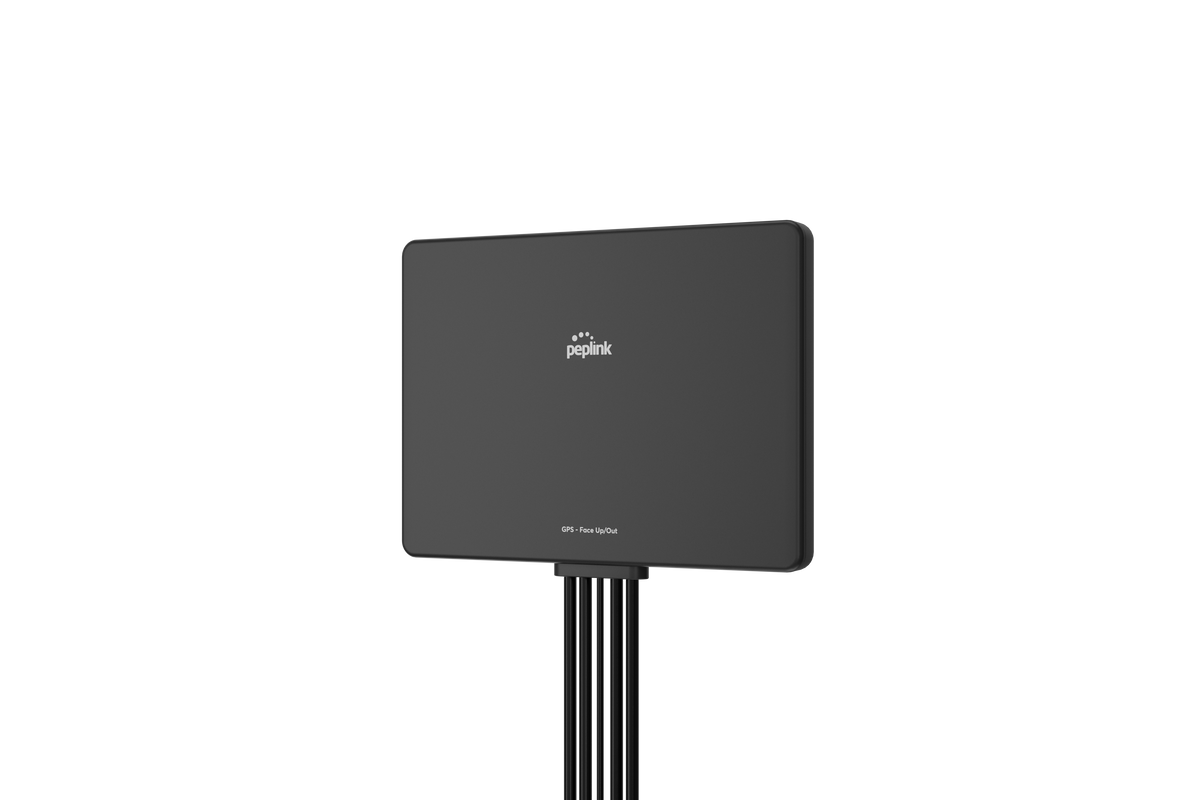

The Peplink Slim 22G is a flat, low-profile antenna with two cellular elements, two Wi-Fi elements, and GPS in one housing. It mounts on a window or wall with hook-and-loop strips, or tucks under a vehicle dashboard.
Check your router first
The Slim 22G is for routers with two cellular ports. Most current 5G routers, including every Peplink and the Spitz AX we sell, have four cellular ports and get full performance from a 4x4 antenna like the Slim 40G or Mobility 40G. If you're not sure how many ports yours has, call us before you order.
Where it fits
- Older or compact routers with two cellular ports and Wi-Fi ports
- Window mounts at a home or small office
- Vehicles where you want the antenna hidden behind the dash
Installing it
Mount it with the top edge pointing up toward the sky, on the window that faces the nearest tower. Keep it off metal window film and away from large metal objects. The cables are 6.5 ft (2 m) long, with SMA connectors for cellular and GPS and RP-SMA connectors for Wi-Fi, so they plug straight into most routers.
Specs
- Elements: 2x cellular (2x2 MIMO), 2x Wi-Fi, 1x GPS
- Cellular: 617 to 960 MHz (4.1 dBi), 1710 to 2700 MHz (4.3 dBi), 3400 to 4200 MHz (6.0 dBi), 5000 to 6000 MHz (7.5 dBi)
- Wi-Fi: 2.4 to 2.5 GHz (5.5 dBi), 5 to 6 GHz (5.7 dBi)
- GPS: 1561 to 1602 MHz, with a 28 dB LNA
- Cables: 6.5 ft (2 m); CFD-200 for cellular and Wi-Fi, RG-174 for GPS
- Connectors: SMA male (cellular, GPS), RP-SMA male (Wi-Fi)
- Size: 7.09 x 5.12 x 0.59 in
- Housing: UV-stable black polycarbonate, IP55
- Operating temperature: -40 to 176°F
- In the box: antenna and four hook-and-loop strips
See all cellular antennas.
+$149.00

Discount applied automatically at checkout.
SpeedFusion bonding speeds
A small business router with 5G built in
The Peplink B One 5G is a desktop router for offices and small shops. It has a 5G modem inside, two wired WAN ports, and Wi-Fi 6, so one box can run your main internet, a second line, and cellular backup.
Where it fits
- A small office or retail shop that wants backup internet without adding another device
- A Starlink or fixed wireless setup that needs a second connection to fall back on
- A front desk or back office where a rack-mount router would be overkill
How it works with a Crosstalk Mobile SIM
Put a Crosstalk Mobile SIM in the B One 5G and cellular becomes another WAN connection. Set your wired line as primary with 5G as backup, or use both at once. Add a static IP and remote access keeps working when traffic moves to 5G. Pair the router with a plan on this page and the hardware price drops 10% at checkout.
Tech notes from our engineers
- The USB-C port works as another WAN, for a phone or USB modem you want as a last-resort backup.
- Wi-Fi WAN lets it use a nearby Wi-Fi network as an uplink. It also runs up to 16 SSIDs, so guests, staff, and cameras can each get their own network.
- The case is plastic and rated to 113°F, so keep it indoors. It isn't meant for a hot vehicle. For vehicles, use the MAX BR1 Pro 5G.
- In a back office with weak signal, connect a Poynting XPOL-24 or a Slim 40G window antenna to the four SMA ports.
- An active PrimeCare subscription includes 500 GB a year of SpeedFusion Connect data and one Virtual WAN. Renewals are PrimeCare B.
Specs
- Built-in 5G modem (standalone and non-standalone) with a second SIM slot
- 2 Gigabit Ethernet WAN ports, plus USB-C WAN
- 4 Gigabit Ethernet LAN ports
- Dual-band Wi-Fi 6, 2x2 MIMO
- Up to 1 Gbps router throughput, 400 Mbps SpeedFusion VPN
- Sized for 1 to 150 users
- Local web admin or cloud management in Peplink InControl
Common questions
Do I need PrimeCare?
PrimeCare unlocks the full SpeedFusion feature set, and the first year comes with the router.
Will it work with Starlink?
Yes. Plug Starlink into one WAN port and the 5G modem takes over when Starlink drops out.
Which plan should I pick?
Monthly is $149 with no contract. Annual works out to $119 a month, billed once a year. Both are truly unlimited.
B One 5G or Balance 310 Fiber 5G?
The B One 5G covers 1 to 150 users. For 50 to 500 users or a fiber SFP handoff, look at the Balance 310 Fiber 5G.
Questions before you buy? Call or text a network engineer at 888-381-7750, Monday through Friday, 6:30 AM to 3:00 PM Pacific.
Looking for service? See our unlimited data plans for this router. You can also read why we recommend Peplink.
Official Peplink data sheet — full specs, ports, throughput, and regulatory info.
Open data sheet (PDF · 1.2 MB)Every Crosstalk Mobile router ships with one year of Peplink PrimeCare included at no extra cost. PrimeCare bundles three things into a single subscription:
- Direct Peplink technical support. Escalate hardware or firmware issues straight to the manufacturer.
- InControl 2. Cloud management to provision, monitor, and push configurations remotely.
- Full SpeedFusion licensing. Carrier bonding, hot failover, and encrypted SD-WAN tunnels.
After the first year, PrimeCare can be optionally renewed. The router continues to work locally at 100% without an active subscription. If it lapses, you don't lose your network, only the cloud features and direct Peplink support.
Renewal for this router: PrimeCare B · $99.00 / year
Free standard shipping on hardware orders over $250. Same-day shipping if ordered by 2pm EST.
Returns: 14 days from delivery. Items must be in new, unused condition with all original packaging, accessories, and documentation intact. A 10% restocking fee applies to all returns (waived for items that arrive defective or dead on arrival). Original shipping charges are non-refundable; return shipping is the customer's responsibility. Peplink subscription licenses (PrimeCare, Virtual WAN, SpeedFusion) are non-refundable. Email CustomerService@CrosstalkMobile.com with your order number to start a return.
